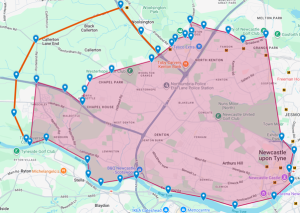
 The proposed boundary extension is intended to ensure that patients living in newly developed housing areas have access to local GP services. Holmside Medical Group has a long-standing history of providing primary care to the surrounding community, and these new developments are a natural extension of the population we already serve. The proposed change simply incorporates these new residential areas, which currently fall just outside our existing practice boundary, allowing us to continue delivering accessible, high-quality care to our local community.
We want to hear from you. You can respond between the 27/07/2026 to 21/08/2026
✅ Completing our online survey:
The proposed boundary extension is intended to ensure that patients living in newly developed housing areas have access to local GP services. Holmside Medical Group has a long-standing history of providing primary care to the surrounding community, and these new developments are a natural extension of the population we already serve. The proposed change simply incorporates these new residential areas, which currently fall just outside our existing practice boundary, allowing us to continue delivering accessible, high-quality care to our local community.
We want to hear from you. You can respond between the 27/07/2026 to 21/08/2026
✅ Completing our online survey: 
Repeat Prescriptions: Don’t wait until it’s too late
If you take regular medication, it’s vital to plan ahead and order your repeat prescriptions in good time.
Taking daily medication is an important part of treatment, especially for people with long-term health conditions. People can become seriously ill quite quickly if they run out.
Every year, NHS 111 gets thousands of calls from people who have lost or run out of their prescribed medication, particularly over weekends or Bank Holidays.
This can all lead to unnecessary emergency prescriptions, visits to urgent treatment centres or, in some cases, A&E.
Ordering prescriptions early is the best way to keep you healthy and avoid extra strain on NHS services.
Order in time
It’s important to remember that prescriptions can take three full working days from request to collection.
At busy times – Monday mornings or immediately before or after Bank Holidays, for example – the volume of requests can make this time longer.
Remember that a request sent late on a Friday may not be seen until Monday morning. Three full working days would mean the prescription wouldn’t be available until Thursday.
We advise giving a whole week’s notice to avoid unnecessary delays.
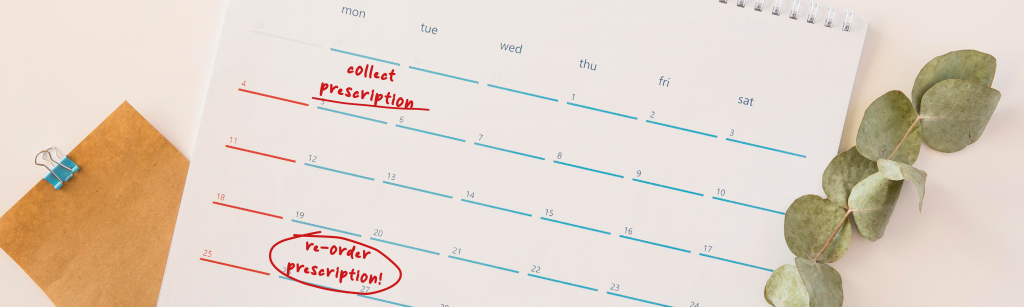
Why not write a note on your calendar or set a reminder on your phone? If your batch has pills for 28 days, set yourself a reminder for three weeks on the day you pick them up.
Use the NHS App
The NHS App allows people who take regularly prescribed medication to quickly, easily, and conveniently request their next batch of medicine.
You can send your request at any time of the day or night – there is no waiting for the practice to open, no phone calls, and no need for extra trips to the practice.
Below are quick video guides and instructions for reordering in the NHS App and generating a bar code you can take to any Pharmacy.
These are the quickest and easiest ways for you and GP practices.
Order a Repeat Prescription
- Open the NHS App and make sure you are logged in.
- Tap Repeat Prescriptions in the centre of the homepage
- You can view or change your nominated pharmacy.
- Tap the green Continue button.
- You can view your medicines and select any you would like to request.
- Tap the green Continue button.
- Check you are happy with the details, and tap the green Request prescription button
- You can see what to do next and view the status of your requests
Collect with a Barcode
If you don’t have a nominated pharmacy, you can use the NHS App to create a barcode, which you can use to collect your medication anywhere.
- Open the NHS App and make sure you are logged in.
- On the home page, select View and manage prescriptions
- Select Your confirmed prescriptions
- Select View Prescription
- Click Prescription barcode
- Find a convenient Pharmacy
- Make your way there and show the barcode
Need Help?
NHS 111 is available 24/7 for advice on medical issues, but ordering your prescriptions on time helps reduce unnecessary calls and eases pressure on the NHS.
Stay well by ordering your repeat prescriptions early, and enjoy peace of mind knowing you have your medication when you need it.